Introduction
In many automation systems, a Technosoft drive operates as a slave device under the control of a CANopen or EtherCAT master. The master is responsible for sending commands, writing object values, starting motion profiles, modifying parameters, and reading drive status information as part of the machine control sequence.
During commissioning and troubleshooting, it is often useful to observe the internal behavior of the drive independently of the master application. While the master provides the control interface, users may need additional insight into how commands are processed and how the drive responds.
EasyMotion Studio II provides this capability. A Technosoft drive can communicate with a CANopen or EtherCAT master while simultaneously maintaining a separate connection to EasyMotion Studio II through an available service interface such as RS-232, USB, CAN, an Ethernet adapter, or Ethernet over EtherCAT (EoE). This allows users to monitor drive operation, inspect internal values, and perform diagnostics without affecting normal network communication.
Parallel Access for Drive Diagnostics
When a Technosoft drive is used as a slave in a CANopen or EtherCAT network, the master remains fully responsible for application control. At the same time, EasyMotion Studio II can serve as a dedicated diagnostic and monitoring tool.
This parallel access is particularly valuable during commissioning and system validation, allowing users to observe the internal state of the drive in real time and verify that commands received from the master produce the expected results.
Typical diagnostic tasks include:
- Verifying that object values written by the master have been correctly updated inside the drive.
• Monitoring the drive Statusword and operating state.
• Checking active warnings, faults, and protection conditions.
• Observing actual position, velocity, current, and other feedback signals.
• Confirming the execution of motion commands and profile parameters.
• Monitoring digital and analog I/O states.
Control Panels
EasyMotion Studio II includes several predefined Control Panels that display useful information from the drive in a clear graphical format. These panels are designed for fast inspection of the most important values without manually searching through all parameters.
The default Control Panels include:
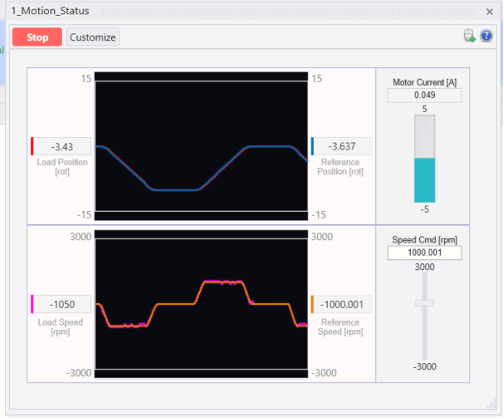
- Motion Status – displays information related to load position, speed and motor current.
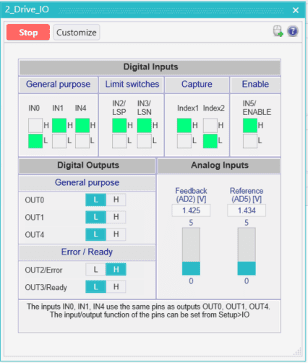
- Drive IO – displays the state of the digital inputs and outputs, as well as the analogue input levels.
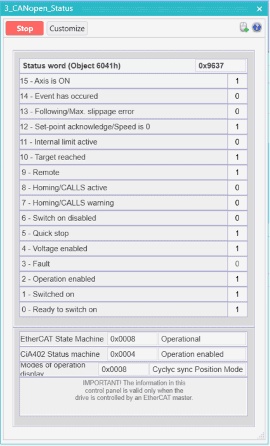
- CANopen Status – displays the CANopen state machine information.
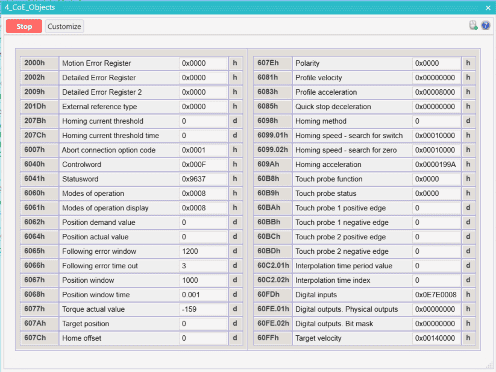
- CANopen Objects – displays the value of important CANopen objects.
- Drive Status – displays the bit values from important status and error registers such as SRL, SRH, MER, DER and DER2.
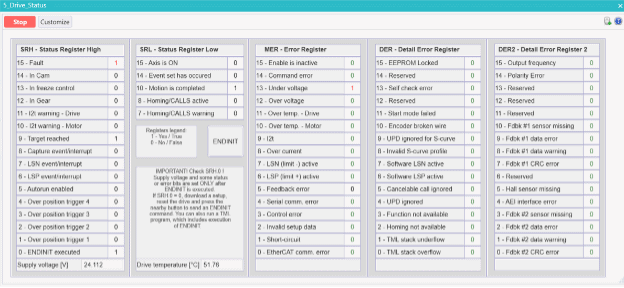
Another advantage is that Control Panels are customizable. By right clicking on a panel and selecting the Customize option, the user can modify the displayed content, create a new panel from scratch, or import and export existing panels using the Control Panels menu.
Command Interpreter
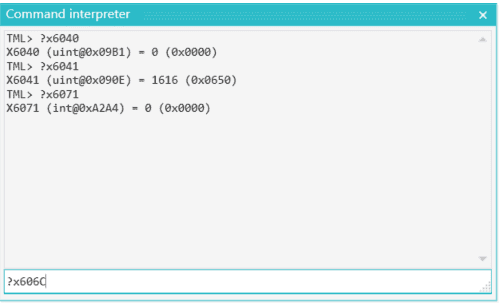
For direct access to drive data, EasyMotion Studio II also includes the Command Interpreter tool. This tool allows the user to send online TML commands to the connected drive or intelligent motor.
The Command Interpreter is useful when the user wants to check a specific value, read a register, inspect a parameter, or test a command directly. If the master writes an object and the user is not sure that the value was correctly applied, the Command Interpreter can verify the result from the drive side.
Logger and Scope
EasyMotion Studio II includes two data acquisition tools that can be used to monitor and analyze drive behavior during operation: Logger and Scope.
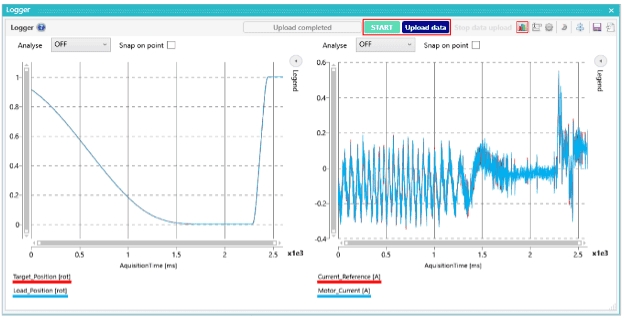
The Logger records selected variables directly in the drive memory at the control loop level. Because the data is captured internally, the recorded values accurately reflect the drive’s real-time behavior and are not affected by communication delays.
This makes the Logger particularly useful for analyzing position, velocity, current, following error, and other signals during motion execution.
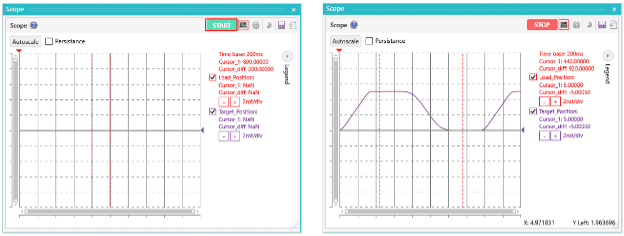
The Scope works as a four-channel oscilloscope, continuously monitoring the real-time evolution of variables, parameters, registers, or input/output states.
It offers immediate visual feedback and is ideal for watching parameter changes as they happen, especially when paired with bidirectional movement for instant confirmation.
Both tools let you save your recordings as native files, text, images, or Excel-compatible CSV for later study.
Conclusion
Technosoft drives are designed to integrate easily into CANopen and EtherCAT systems, but they also keep the flexibility needed for practical commissioning and debugging. Even when the drive is controlled by an external master, EasyMotion Studio II can be connected in parallel through an available communication interface.
Control Panels provide quick access to important status information and object values. The Command Interpreter allows direct reading and writing of any TML parameter or variable. The Scope offers continuous real-time feedback, while the Logger provides precise acquisition for detailed motion analysis.
Together, these tools make it easier to verify that commands from the master were correctly applied, understand the response of the motor, identify errors.
Contact our team today!