1.Introduction
In production lines, field installations, and large multi-axis machines, one of the most time-consuming and error-prone tasks is getting a drive ready to run. Traditionally, each new or replacement unit has to be connected to a PC, opened in a configuration tool, set up, tuned, and only then put into service. This works well on the engineer’s bench, but it quickly becomes a bottleneck on the factory or at a remote site, where installing and operating dedicated software on every machine is simply not practical.
Technosoft intelligent drives are designed to remove this obstacle. Once a setup has been prepared, a brand-new, completely unprogrammed drive can be dropped into a system and commissioned automatically by the machine without EasyMotion Studio application, without a laptop, and without any specialist intervention at the installation site. This article explains how this is possible and what it means for system integrators, OEMs, and maintenance of the system.
- Configuration as a software file
Every Technosoft drive stores the complete drive and motor setup in its non-volatile memory. This includes all the parameters required for motor control, motion programs (TML), homing and interrupt routines, product and application ID. When the drive is powered on, it automatically loads this stored setup and initializes itself, ensuring it is ready to operate exactly as configured.
The entire configuration can be captured after the initial drive commissioning process and exported as a single portable software file (.sw). Using EasyMotion Studio II, an engineer configures and tunes a “golden” drive for the application, then exports its complete setup into this file.
Once created, the configuration is no longer tied to the software used to generate it. The software file becomes a standalone file that can be stored on a PLC, master controller, server, or any other convenient location.
This approach enables automatic commissioning of replacement or new drives. The system can load the configuration directly from the stored file, eliminating the need for a configuration tool and minimizing engineering effort. The entire process is handled automatically by the machine or control system itself.
- Commissioning driven by the master
Because Technosoft drives support standardized industrial communication, the master controller can write a stored setup directly into a connected drive over the existing network the same cabling already used to command motion. No additional tools, converters, or PC connections are needed.
In practice, this means a system can be built to recognize a freshly installed, unprogrammed drive and load the correct setup into it on its own. Over an EtherCAT network, for example, the master can transfer a complete setup to the drive using the standard File-over-EtherCAT (FoE) mechanism, or write the configuration into the drive’s memory through standard communication objects. It is also possible to write the setup to a new drive with dedicated Technosoft tools, so integrators are free to choose the architecture that best fits their system.
The result is a plug-and-play solution:
- A new or replacement drive is mounted and wired into its station.
- On power-up, the master detects the connected unit.
- The master compares the drive’s application ID with one found on the software file.
- If the drive is blank or carries the wrong setup, the master automatically downloads the correct configuration file.
- The drive initializes itself and is immediately ready to run.
All of this happens without anyone opening a configuration program at the installation site.
- Firmware can be updates the same way
Commissioning is not limited to the application setup. When required, the drive’s firmware can also be transferred over the same network connection again using the File-over-EtherCAT mechanism so that a unit can be brought fully up to date as part of the same automated procedure. This ensures that every drive entering the system, regardless of when it left the factory, can be programmed to a known, validated firmware and configuration.
- Technosoft programming tools
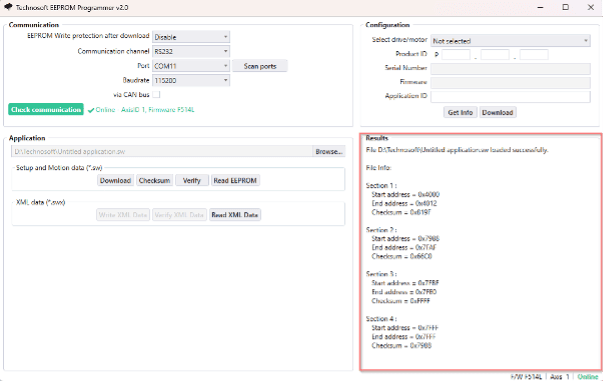
Technosoft provides a dedicated utility called the EEPROM Programmer Tool to streamline the commissioning prosses.
This tool allows direct communication with the drive, making it easy to upload a software file (.sw) and modify the drive’s Application ID, which is used by the master controller during the automatic commissioning process.
The tool also provides useful information about the uploaded software file, including its start and end memory addresses. This information can be valuable when implementing configuration downloads through dedicated EtherCAT objects.
This paper focuses on the concept and benefits of automated commissioning. For a detailed description of the implementation process, supported EtherCAT objects, and programming examples, please refer to the EtherCAT Programming User Manual.
- Advantages of using this automated commissioning
- Faster, simpler production. On an assembly line, drives arrive as identical, unprogrammed units and are commissioned automatically as the machine is built and powered. There is no per-unit manual setup, no software to license and maintain on production stations, and no risk of an operator applying the wrong settings by hand.
- Easy field replacement. When a drive needs to be swapped in the field, a technician simply removes the old unit and installs a new one straight from the box. The master recognizes the replacement and reprograms it automatically. Downtime is reduced to the time it takes to change the hardware no laptop, no software expertise, no configuration knowledge required at the site.
- Because every drive is commissioned from the same stored configuration file, the entire fleet is guaranteed to run identical, validated settings. The configuration is defined once, reviewed once, and applied automatically every time eliminating the variability that comes with manual, drive-by-drive setup.
- Ease of use. The detailed engineering work motor tuning, control parameters, motion sequences is done once by the experts and embedded in the configuration file. The people installing and maintaining the equipment do not need to understand motion control theory or learn a configuration tool; they only need to connect the hardware and let the system do the rest.
- Conclusion
A brand-new, unprogrammed drive can be installed and commissioned automatically, reducing setup time and minimizing configuration errors. This capability is a key strength of the design, enabling drives to operate as interchangeable, software-configurable units. The entire setup is stored in a single image file that can be deployed directly by the system itself.
By moving commissioning from the engineer’s bench to the machine’s own controller, Technosoft drives shorten production cycles, decrease integration complexity, and guarantee consistency across an entire installed base all without requiring the original configuration software anywhere near the final application. Set it up once, and let your system take care of the rest.
Contact our team today!