- Introduction
In the automation industry, motors must work together to perform specific movements under certain mechanical conditions, which would otherwise be impossible to achieve by a single axis.
Most often than not, multiple axes (drive + motor combination) are needed especially in factories (e.g.: plastic bottle industry, packaging industry, etc.), or in the medical field (e.g.: pipetting, glass cutting lasers, etc.). In these kinds of scenarios, all axes must run together in a synchronized manner which is usually handled by a Master device.
In order to reduce the overall costs and reduce the machine complexity, new motion control features were created which can replace / reduce the need of an external control device or mechanical connections and transmissions with just some smart software / networking solutions.
- Electronic Gearing
One such software solution is electronic gearing. This replaces the mechanical transmission in situations where 2 or more separate axes must run in synchronism with each other (either with the same speed like for example the wheels of a car or with different ratios like the hands of a clock).
Beside the need of maintenance in such cases, a mechanical transmission is also creating a serious hindrance if the machine needs to be reconfigured for different gear ratios. Electronic gearing solves these issues by digitally controlling two motors as if they had a gearbox between them, whereas now the gear ratio is set by the user in the EasyMotion Studio II software.
To use Electronic Gearing, the drives controlling the two motors must be able to communicate between each other (CAN network) in order to synchronize and exchange information about the position and/or the speed.
The two drivers will act as Master and Slave of Electronic Gearing and with the help of a proprietary communication procedure the synchronization between the axes is ensured down to the control loops of all the drives involved. This powerful feature eliminates any possible drift between the master and the slaves.
In EasyMotion Studio II, the user can enable this mode by selecting the “Electronic Gearing” Motion dialogue in the TML code of all the drives in use. Then, for each drive, it must be specified which one will be the Master and which one/s will be the Slave/s.
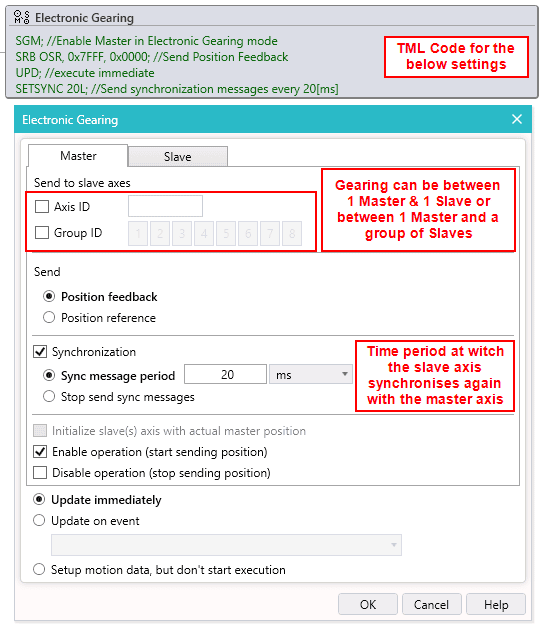
For the Electronic Gearing Master, the dialogue will contain the following sections:
- Send to slave axes: In this section it can be specified to which axis or group of axes the master should synchronize with and send its position information.
- Send Position Feedback or Position Reference: This indicates what information the Master will send to the slaves, either the Position Feedback (read from its encoder) or the Position Reference (from internal reference generator).
- Synchronization: the Master will send a sync message to the slave/s at every “sync message period” (set by the user – recommended 20ms). When enabled, all the Technosoft drives from the network will be synchronized within a 10µs time interval.
- Initialize Slaves/s axis with actual master position: enabling this option is recommended for the cases where the Slave/s axes are set in Electronic Gearing prior to the master.
- Enable and Disable operation: This gives the option to enable or disable the “Master” mode of operation.
- Update immediately: Used also in other Motion Profiles, the last motion mode programmed (in this case Electronic Gearing) together with the latest motion parameters becomes active.
- Update on event: the last motion mode programmed together with the latest motion parameters becomes active only after a certain condition is met.
- Setup motion but don’t start execution: the last motion mode programmed together with the latest motion parameters are taken into consideration but are not started.
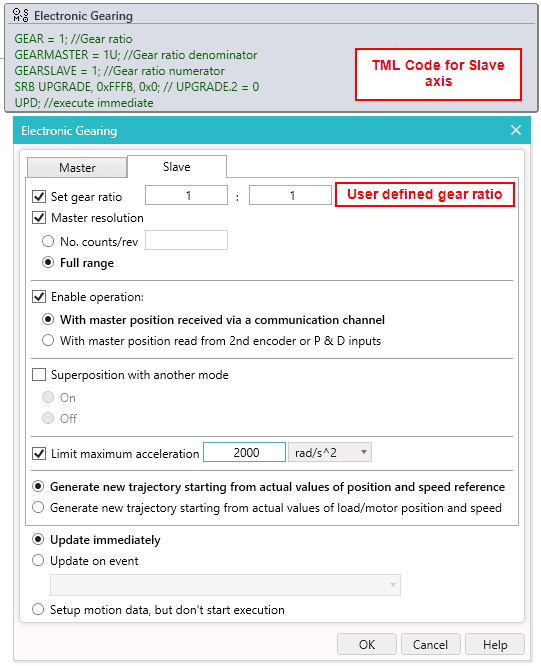
For the Electronic Gearing Slave, the dialogue will contain:
- Gear ratio: the slave will apply this ratio to the position information (Feedback or Reference) received from the Master axis to generate its own reference.
- Master resolution: The user will specify the resolution of the Master in encoder counts per revolution, or select the “Full range” if the Master position is not cyclic (e.g. the resolution is equal with the whole 32-bit range of position)
- Enable operation: In this section it will be specified if the position information of the master is received via the communication channel (CAN) or read from using the 2nd encoder feedback or Pulse and Direction inputs of the Slave drives.
- Super position with another mode of operation: This setting allows the drive to execute other profiles in parallel with the gearing operation. This gives the possibility to add an offset in position of the slave vs. the master or simply increase / decrease the slave speed.
- Limit maximum acceleration: This option allows limiting the possible shocks that might appear depending on the value of the Gear Ratio thus allowing a safe coupling of the slave to the master.
- Trajectory generation: This sets the initial value of the trajectory reference of the Slave prior to it following the master. Can be set with the current position/speed read from the encoder or with the current position and speed reference.
- Electronic Camming
Similar to Electronic Gearing, Electronic Camming is a more complex motion mode that eliminates the need for mechanical cams. Traditionally, when switching to a different size of product (for example in the bottle making industry, from 2L to 0.5ml bottles) it takes a lot of time to switch between the mechanical cams which essentially pause production. Using Electronic camming, this time can be shortened considerably as one can perform simple operations of amplification / reduction or offsetting the cam almost instantly.
The principle is again based on the communication between the Master and Slave axes, only that the slave executes a cam profile function of the master’s position. This cam profile is defined by the user as a cam table which is saved on the slave axis, it is essentially a look-up table on which the X axis is the Master’s position and the Y axis the position of the Slave. With this table, it can be dictated at what position the slave should move to, based on what is the Master’s position – or another way to look at it: the electronic camming is an electronic gearing with a constantly changing gear ratio

The user can save multiple CAM tables in the Drive’s memory and switching between them can be done either via TML programming or via a call from an EtherCAT/CANopen Master.
Allocating space for the CAM table is done in the “Memory Settings” section of the EasyMotion Studio II application tree:

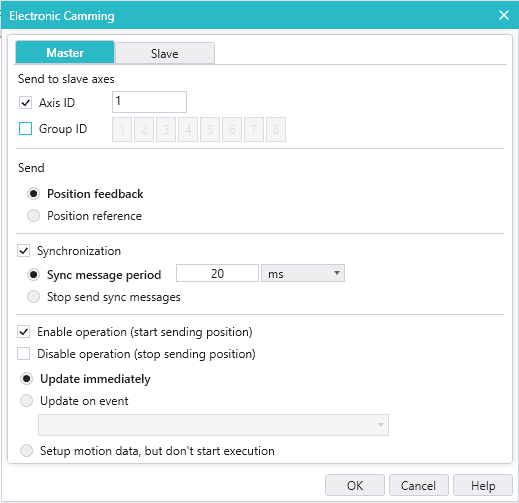
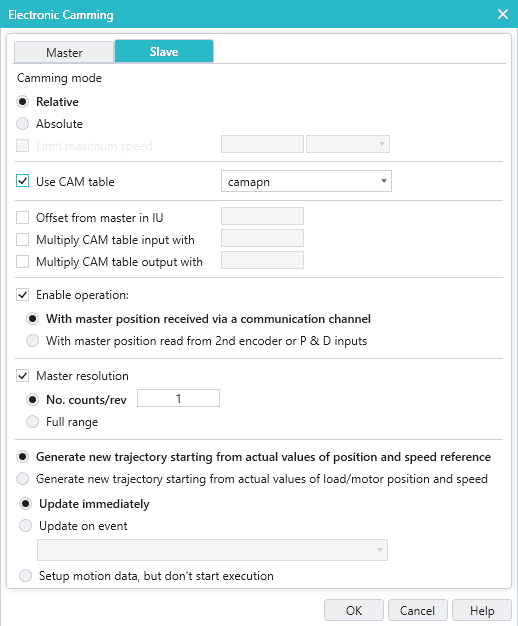
As for the TML motion wizard for Electronic Camming, it is not much different than the one for Electronic Gearing, the differences being in the Slave section, which are as follows:
- CAM table: this indicates to the slave which of the CAM profiles it will execute.
- Offset from master in IU: Applies an offset to the position range of the master, on which the Slave will execute the CAM profile
- Multiply CAM table input with: Multiply the CAM table X axis (Master position) in order to compress/extend it.
- Multiply CAM table output with: Multiply the CAM table Y axis (Slave position) in order to compress/extend it.
- Conclusions
Technosoft drives can execute complex motion profiles in order to suit a wide range of industries, each one with their required capabilities, while the powerful TML programming allows the user to mix and match between different motion profiles (for example multiple drives being in Electronic Gearing while the Master executes a PT profile) resulting in a high degree of programming flexibility which translates directly into machine operation versatility.
Contact our team today!